Lab 1: Linux Commands I
$denotes a user-level account;#denotes a root/super-user account.cd: Change directory (to home directory).cd ..to go up one level.cd -to go back to the previous directory.cd /to go to the root directory.cd ~to go to the home directory.
ls: List files/directories.ls -l [dir]for detailed info (permissions, owner, size, date).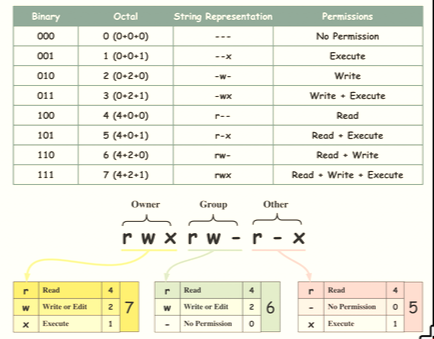
- with
-ordin permissions (e.g.,-rw-r--r--for files,drwxr-xr-xfor directories).
- with
ls -a [dir]to show hidden files (those starting with.).
pwd: Print working directory (shows where you are).cd [dir]: Change directory (cd ..to go up one level,cdto go home).mkdir [dir]: Create a new directory.cp [source] [dest]: Copy files (cp -rfor recursive copy of directories).mv [source] [dest]: Move or rename files.rm [files]: Remove files (rm -rfor recursive delete of directories).chmod [mode] [files]: Change file permissions. (chmod -Rfor recursive).echo: Display a line of text or variables (e.g.,echo $HOME).cat [files]: Concatenate and display file contents.less [files]: View file contents one page at a time (useqto quit).man [command]: Show the manual for a command (e.g.,man ls).
Lab 2: Linux Commands II
- I/O Redirection:
- stdin (0): Standard Input (Keyboard).
- stdout (1): Standard Output (Screen).
- stderr (2): Standard Error (Error messages). Commands & Operators:
|(Pipe): Passes the output of the first command as input to the second command.>: Redirect stdout to a file (Overwrite).>>: Redirect stdout to a file (Append).
2>: Redirect stderr to a file. (Overwrite).2>>: Redirect stderr to a file. (Append).
sort: Sorts lines of text alphabetically/numerically.uniq: Removes adjacent duplicate lines (often used aftersort).uniq -c [file]counts occurrences of each line,[times] [values].
wc: Word count (-lfor lines,-wfor words,-cfor bytes only).- default is
[lines] [words] [bytes] [file]
- default is
grep [pattern] [file]: Search for a pattern in a file and print matching lines.grep -vto invert match (show lines that do NOT match).
head [files]: Show the first 10 lines of a file. (-n [rows]to specify number of lines).tail [files]: Show the last 10 lines of a file. (-n [rows]to specify number of lines).cut [files]: remove sections from each line of files.paste [files]: merge lines of files horizontally.join [files]: join lines of two files on a common field.-tfor delimiter,-jfor join field-1 FIELD -2 FIELD ...
comm [files]: compare two sorted files line by line.diff [file1] [file2]: Show differences between two files.
Warning
ls -l /abc/def > ls-output.txterror atls -l: No such file or directory.echo "1\n2\n1" | uniqoutputs1\n2\n1becauseuniqonly removes adjacent duplicates, and the two1s are not adjacent.
Example:
cat file1 file2 >> newfilecreates/appends tonewfile.ls -l | less: show long listing of files one page at a time.sort ex4.txt | uniq > ex5.txt: sortsex4.txt, removes duplicates, and saves toex5.txt.echo "error 1\ntest 2" | grep "error" > error.log: result toerror.logcontainserror 1.
file1.txt:
101,Alice
102,Bob
103,Charlie
105,Eve
file2.txt
101,HR
102,Engineering
103,Sales
104,Marketing
paste file1.txt file2.txt
101,Alice    101,HR
102,Bob      102,Engineering
103,Charlie  103,Sales
105,Eve      104,Marketing
join -t ',' -j 1 file1.txt file2.txt
101,Alice,HR
102,Bob,Engineering
103,Charlie,Sales
comm file1.txt file2.txt
- three columns: (1) lines unique to file 1, (2) lines unique to file 2, and (3) lines common to both.
101,Alice
        101,HR
102,Bob
        102,Engineering
... (and so on)
Process Management:
ps: Lists current processes (Snapshot) owned by the current user and running in current terminalps aux: Lists all processes with detailed information (including those from other users).
| Column Header | Contents |
|---|---|
| USER | Username of the process’s owner |
| PID | Process ID Number |
| %CPU | Percentage of the CPU the process is using |
| %MEM | Percentage of memory the process is using |
| VSZ | Virtual memory allocated (KBytes) |
| RSS | Physical memory usage (Resident Set Size in KBytes) |
| TTY | Terminal associated with this process |
| STAT | Process Status Code (R= Running, Z = Zombie, T=Terminated, S=Sleep, s=Session Handler, l=Multi-Thread) |
| START | Time when process start |
| TIME | Total CPU Usage |
| COMMAND | Name of command, including arguments if any |
xlogowill create a new process that displays a graphical window with an X logo. You can see this process in thepsoutput.[command] &will run the command in the background, allowing you to continue using the terminal while it runs.fg %jobnumber: Brings the specified background job to the foreground.- if
fgis used without a job number, it will bring the most recently backgrounded job to the foreground.
- if
bg %jobnumber: Resumes a stopped job in the background.Ctrl-Z: Suspends the currently running foreground process and moves it to the background as a stopped job. and can usefgto resume it in the foreground orbgto resume it in the background.Ctrl-C: Sends an interrupt signal to the currently running foreground process, which typically terminates it.
kill [PID]: Terminates a process using its Process ID.
Shell Scripts
[[ ... ]]: These are extended test brackets. They are more powerful than the single[ ]because they handle empty variables and special characters more gracefully.(( ... )): These are used for arithmetic evaluation. They allow you to perform arithmetic operations and comparisons without needing to use the-eq,-ne, e.g.if (( a > b ))instead ofif [ "$a" -gt "$b" ].$(( ... )): This is command substitution. It allows you to execute a command and use its output as part of another command or assignment. e.g.echo $((5 + 3))will output8.
Warning
there must be a space between CONDITION and
[ CONDITION ]
To run a shell sript.
- Write the script including a proper shebang (e.g.,
#!/bin/bash) - Make the file executable (for example,
chmod 755 script.sh). - Run the script (e.g.,
./script.sh).
#!/bin/bash
# Check if a process name was provided
x="test"
if [ $x = "test"] ; then
	echo "This is a $x process monitor script."
fi

for i in {1..7..2}; do
    echo "Number: $i"
done
# Output: 1, 3, 5, 7

while true; do
	echo "System is running..."
	sleep 2 # Pause for 2 seconds so you don't flood the screen done
done

if [[ -z $1 ]]; then
    echo "Usage: ./monitor.sh [process_name]"
    exit 1
fi

# Search ps aux for the process, excluding the grep command itself
if ps aux | grep -v grep | grep "$1" > /dev/null; then
    echo "Process '$1' is currently running."
else
    echo "Process '$1' is NOT running."
fi
if [[ -z $1 ]]; then$1is the first argument passed to the script-zchecks if it is empty (i.e., no process name provided).-nchecks if it is not empty.
%modulo,/to floor divisionps aux | grep -v grep | grep "$1" > /dev/null; thenps auxlists all processes.grep -v grepexcludes thegrepcommand itself from the results.grep "$1"searches for the specified process name.> /dev/nulldiscards the output, we only care about the exit status.- if the process is found, the exit status is 0 (true), otherwise it is non-zero (false).
| Operator | Meaning | Usage Example |
|---|---|---|
-gt | Greater Than (>) | if [ "$a" -gt "$b" ] |
-lt | Less Than (<) | if [ "$a" -lt "$b" ] |
-ge | Greater or Equal (>=) | if [ "$a" -ge "$b" ] |
-le | Less or Equal (<=) | if [ "$a" -le "$b" ] |
-eq, = | Equal (=) | if [ "$a" -eq "$b" ] |
-ne, ! = | Not Equal (!=) | if [ "$a" -ne "$b" ] |
Lab 3: NIC and ARP
- NIC (Network Interface Card): Hardware component for network connection (e.g.,
eth0,eth1). - MAC Address (Physical): or hardware address is 48-bit (6 bytes), Layer 2, assigned by manufacturer, fixed (e.g.,
00:0C:F5:09:56:E8). - IP Address (Logical): 32-bit (IPv4), Layer 3, Used to identify and locate devices.
- Private IP: Dynamic Local usage assigned by DHCP (e.g.,
192.168.x.x). - Public IP: Global usage assigned by ISP, routable on the internet.
- Private IP: Dynamic Local usage assigned by DHCP (e.g.,
- Default Gateway: The “exit point” for data leaving your local network.
- ARP (Address Resolution Protocol): Maps IP addresses to MAC addresses.
- when sending a message: contain 4 field:
source IP,destination IPwhose both stay the same across sending process, andsource MACanddestination MACwhich will change at each hop representing the MAC address of the current sender and the next hop (e.g., router or destination).
- when sending a message: contain 4 field:
Commands:
ipip [addr]/[link] show: Show IP addresses and network interfaces.sudo ip addr add [192.168.10.1/24] dev [eth1]to add an IP address to a specific interface.sudo ip link set [eth1] upto enable a specific interface.sudo ip link set [eth1] downto disable a specific interface.
ifconfig: Set up and display network interfaces (IP, MAC, Netmask).ifconfig -ato show all interfaces, including those that are down.ifconfig [NICname]to show specific interface details, e.g.ifconfig eth0sudo ifconfig [NICname] downto disable an activate interface.sudo ifconfig [NICname] upto enable an inactivate interface.sudo ifconfig [NICname] [IP]assign IP address e.g.sudo ifconfig eth1 192.168.10.50
| Column Header | Contents |
|---|---|
| USER | Username of the process’s owner |
| PID | Process ID Number |
| %CPU | Percentage of the CPU the process is using |
| %MEM | Percentage of memory the process is using |
| VSZ | Virtual memory allocated (KBytes) |
| RSS | Physical memory usage (Resident Set Size in KBytes) |
| TTY | Terminal associated with this process |
| STAT | Process Status Code (R= Running, Z = Zombie, T=Terminated, S=Sleep, s=Session Handler, l=Multi-Thread) |
| START | Time when process start |
| TIME | Total CPU Usage |
| COMMAND | Name of command, including arguments if any |
Note
When
ApingB, both devices caches the IP-to-MAC mapping in their ARP cache.
ping [IP]: Test connectivity using ICMP Echo Request/Reply,ping -i [n]to specify interval between packets (default is 1 second).ping -c [n]to specify the number of packets to send (default is infinite).ping -s [n]to specify the size of the ICMP payload (default is 56 bytes, which results in 84 bytes when including the ICMP header).- e.g.
ping 10.10.6.1PING 10.10.6.1 (10.10.6.1) 56(84) bytes of data.64 bytes from 10.10.6.1: icmp_seq=1 ttl=128 time=... ms - 56 means the default data length (bytes).
- 84 means the message length (bytes) which consists of the header (8 bytes of ICMP header and 20 bytes of IP header) the data length (56).
- 64 bytes mean the message length (default data length (56 bytes) and ICMP header (8 bytes)) sent back from the destination.
- ttl stands for time to live (represents the maximum number of IP routers that the packet can go through before being thrown away.).
- time identifies the packet round trip time (rtt).
arp: View or modify the ARP cache.arp -n: Display ARP entries without resolving hostnames (shows IP and MAC addresses)arp -a [IP address]: To find the MAC address of a particular IP address in ARP cache.arp -i [NICname]To find the MAC address of a particular specific network interface in ARP cache.
Lab 4: TCPDUMP and WIRESHARK
For error
tcpdump: traff1.dump: Permission denied
sudo apparmor_parser -R /etc/apparmor.d/usr.sbin.tcpdu
tcpdump: to capture and analyze network via a specific NIC-Dto list available interfaces for capture.-i [interface]to capture packets on a specific interface.-c [n]to capture a specific number of packets.-w [output.dump]to save captured packets to a file for later analysis.-i [interface] -c [n] -w [output.dump] [protocal]to save (optionally only [protocal]) [n] captured packets from [interface] to a file [output.dump] for later analysis.sudo tcpdump -r [FileName]to read and analyze packets from a saved file.
- ICMP Types:
- Type 0: Echo Reply.
- Type 8: Echo Request.
- Type 3: Destination Unreachable.
Wireshark
- Wireshark Filter GUI:
- Display filter: You will fill in a command here to show specific packets.
- Packet-listing window: It will display a one-line summary for each packet consisting of source IP, destination IP, packet protocol, packet length (bytes), and packet-summary information.
- Packet-detail window: It provides more details of the packet selected (highlighted) in the packet-listing window.
- Packet-content window: It displays the entire contents of the captured frame header information, flags, payload data, ASCII, and a hexadecimal representation
- Wireshark Filter:
- logical operator:
&&(AND),||(OR),!(NOT) - Filter:
ip.addr: packets from this IP addressip.src: packets from this source IP addressip.dst: packets to this destination IP addressframe.len: frame lengthshttp.host: packets with this HTTP host header
- Protocal:
arp,icmp,tcp,udp, etc. - Example:
dns.qry.name == "www.siit.tu.ac.th"http.host == www.tu.ac.th: Show packets with HTTP host headerwww.tu.ac.th.ip.addr == 192.168.1.1: Filter by specific IP.arp || icmp: Show ARP or ICMP packets.frame.len < 1000: Show packets smaller than 1000 bytes.- packets sent from the 203.131.212.198 or the packets send to 35.197.141.103 (i.e., www.siit.tu.ac.th):
ip.src==203.131.212.198 || ip.dst==35.197.141.103
- logical operator:
Lab 5: Essential Networking Commands
- DNS (Domain Name System): Resolves Hostnames (URL) to IP addresses.
- Routing: Determining the path for data to travel across networks.
- Gateway: A device that connects different networks and routes traffic between them.
- Default Gateway: IP address of the router that connects your local network to other networks (e.g., the internet).
DNS Tools:
hostname: View or set the machine’s hostname (sudo hostname [new name]).nslookup [domain name]: Query DNS to find IP of a domain,nslookup www.siit.tu.ac.thdig [domain name]: More detailed DNS query toolhost [domain name/IP address]: Simple lookup for Name-to-IP or IP-to-Name.whois [domain name]: Query domain registration information.
Routing & Diagnostics:
route: show routing table same withnetstat -rrouter -n: IP address instead of hostnames
- Note
default,0.0.0.0: default, not specified, It defines the route for all traffic destined for networks not explicitly listed in the routing table.Flags:U: route is up,G: the gateway should be used for route.Iface: NIC NameGenmask: Netmask
- Explanation:
- Line 1: If the IP address you are trying to reach is NOT with local reachable (
0.0.0.0), it must send these packets to the gateway 192.178.18.1, which will relay these packets to other routers/gateways. - Line 2: If this computer sends packets to any IP addresses between
192.178.18.1 – 192.178.18.255(as specified by Network Address192.178.18.0), it can send to that IP address because they are in the same local area network.
- Line 1: If the IP address you are trying to reach is NOT with local reachable (
traceroute [domain/IP]: Shows the path (hops) packets take to a destination.-nto show IP addresses instead of hostnames
- By default, the traceroute command sends three UDP probe packets for each host so three response times are listed.
Note
* * *shows packet loss at that hop (likely that Firewall has dropped these UDP probe packets) Fo fix thatsudo traceroute [IP address] -T
-Tto use TCP SYN packets instead of UDP probes (more likely to get through firewalls).
netstat -s: Statistics by protocolsnetstat -r: Routing tablesnetstart -rnthe same result asroute -n
mtr -n [ip address]: Combinestracerouteandpingto show path and latency to each hop.- The
Loss%: percentage of packet loss at each hop. - The
Snt: number of packets sent. - The
Last: latency (i.e., roundtrip time) of the last packet sent. - The
Avg: average latency (i.e., roundtrip time) of all packets. - The
Best: best (shortest) latency (i.e., roundtrip time) of all packets sent. - The
Wrst: worst (longest) latency (i.e., roundtrip time) of all packets sent. - The
StDev: std. of the latencies (i.e., roundtrip times) of all packets sent
- The
Quiz
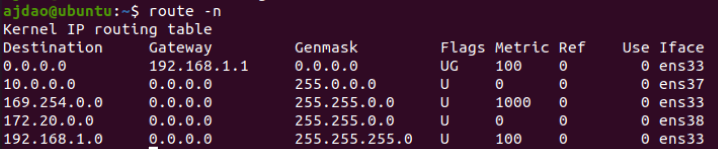 Which IP address will be sent to the default gateway ?
- 192.168.1.50
- 172.20.10.5
- 10.5.6.7
- 8.8.8.8