Summary
DNS
Domain name
Uniform Resource Locator (URL):
http://www.google.com
- Protocol:
http://- Subdomain:
www- Second-level domain:
- Top-level domain (TLD):
.com
-
Domain Name System (DNS): A hierarchical naming system for computers, services, or any resource connected to the Internet or a private network.
-
Live in Application layer (7)
-
To map between IP address to domain name (e.g.,
www.siit.tu.ac.thto10.0.0.1). -
DNS services: hostname-to-IP-address translation, mail server aliasing
why not centralize DNS
- Single point of failure
- Traffic volume (too many queries)
- Distance (latency)
- Scalability (growth of Internet)
- Nameserver: A server that contains a database of public IP addresses and their associated hostnames, and in most cases, serves to resolve or translate those names to IP addresses as requested.
- example: Google Public DNS, Cloudflare
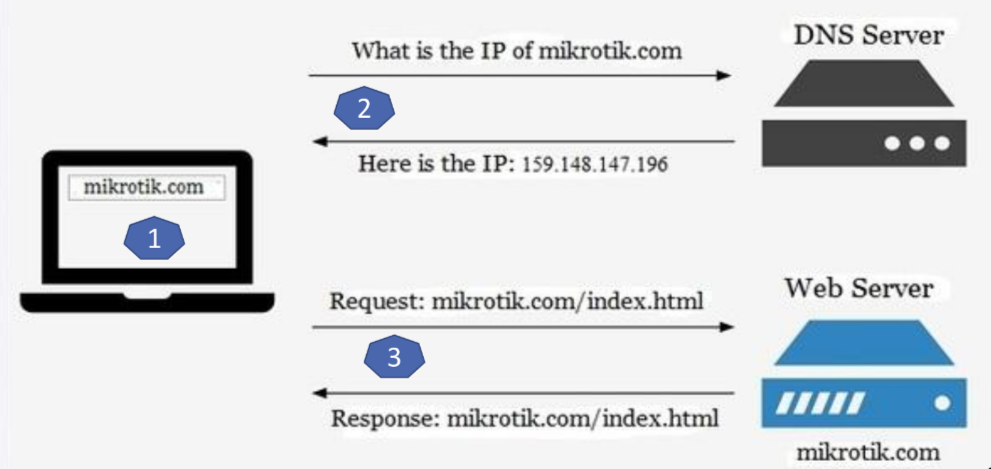
Start the DNS Example
Info
- RR (Resource Record)
- A database entry in a DNS server, single mapping that tells the server how to handle a specific query
- Format:
(Name, Value, Type, TTL)- NS Record (Name Server):
- A record that delegates authority. Point the DNS system to the available server that can answer queries for a particular domain in case that the current server cannot resolve the query.
- Record:
(example.com, dns1.example.com, NS)- A Record (Address):
- The standard record that maps a hostname to an IPv4 address. This is want the DNS system is designed to do.
- Record:
(dns1.example.com, 10.0.0.1, A)- MX Record (Mail Exchange):
- A record that points to the mail server for that domain.
- Record:
(example.com, mail.example.com, MX)- CNAME Record (Canonical Name):
- A record that creates an alias for a domain name. It allows you to point multiple domain names to the same IP address or another domain name.
- Record:
(www.example.com, example.com, CNAME)
- Register name
example.comat DNS registrar
Note
This step is to create pointer to the website
1. provide names, IP addresses of authoritative name server
2. Registrar inserts **NS**, **A** RRs into .com TLD server:
    - `example.com` → `dns1.example.com`
    - `dns1.example.com` →  `10.0.0.1`
2. Create authoritative server with IP address 10.0.0.1
Note
This step is to create endpoint of the website (name server), which will be responsible for answering queries about the domain.
1. Create A RR: `dns1.example.com` → `10.10.0.1`
2. Create MX RR: `example.com` → `mail.example.com`
Query
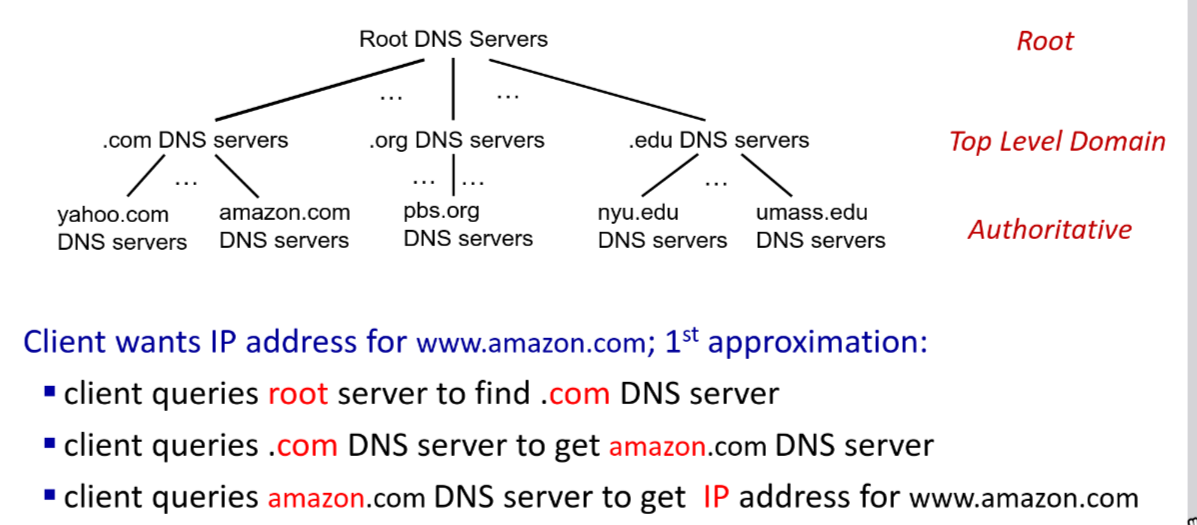
-
Authoritative DNS servers: organization’s own DNS servers providing authoritative hostname to IP mappings for organization named hosts
-
DNS root name servers is contact-of-last-resort
-
ICANN (Internet Corporation for Assigned Names and Numbers) manages root DNS domain
-
DNSSEC (Domain Name System Security Extensions) provides security extensions to DNS, using digital signatures to ensure authenticity of DNS data and prevent attacks like cache poisoning.
-
When host makes DNS query, it is sent to its local DNS server
- local DNS server returns from it local cache or forwarding request into DNS hierarchy for resolution
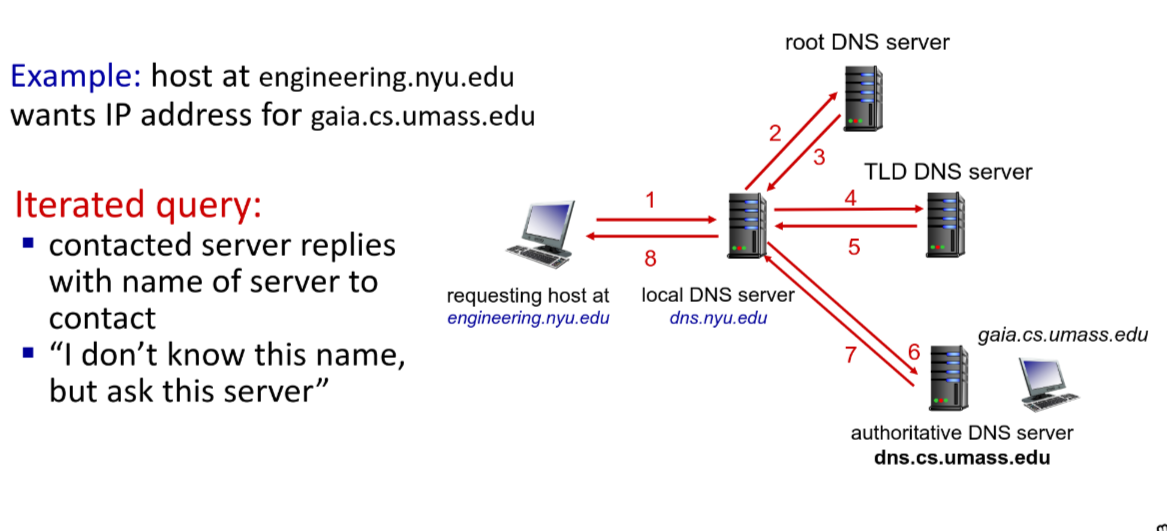
- local DNS server returns from it local cache or forwarding request into DNS hierarchy for resolution
Query format
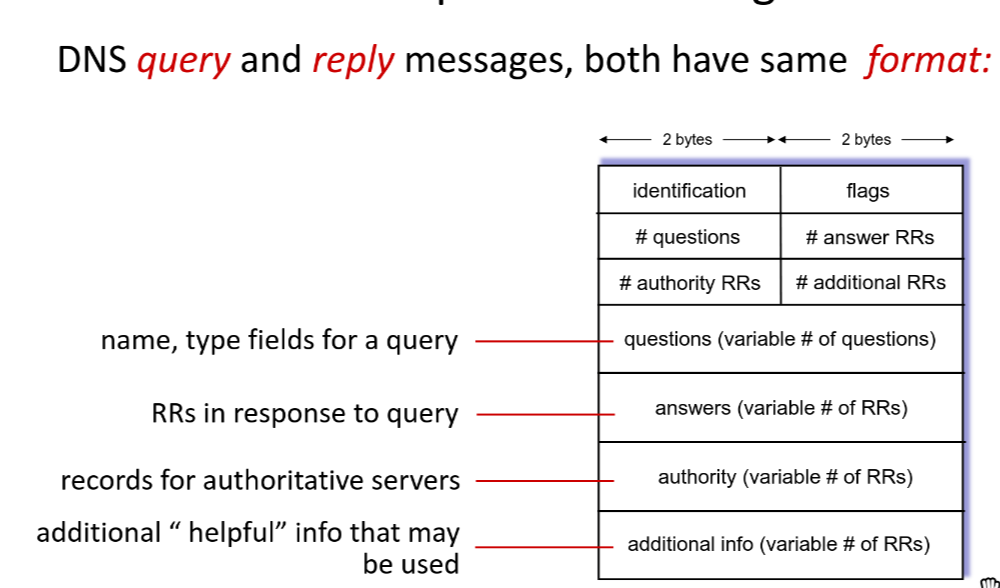
- Identification: 16 bits for query
- Flags:
- query or reply
- recursion desired
- recursion available
- reply is authoritative
DNS security
- DDoS: Attackers can overwhelm DNS servers with a flood of requests, causing them to become unresponsive and disrupting access to websites and services.
- Bombard TLD servers: Attackers can target TLD servers with a flood of requests, causing them to become unresponsive and disrupting access to all domains under that TLD.
- Spoofing attacks:
- Cache poisoning: Attackers can inject false DNS records into a DNS server’s cache, causing users to be redirected to malicious websites instead of the intended ones.